
5 Best Business Internet Providers in Augusta Georgia: Which Ones Bundle LTE Backup
Sep 14, 2026 | By Startuprise
 Follow us
 Follow us
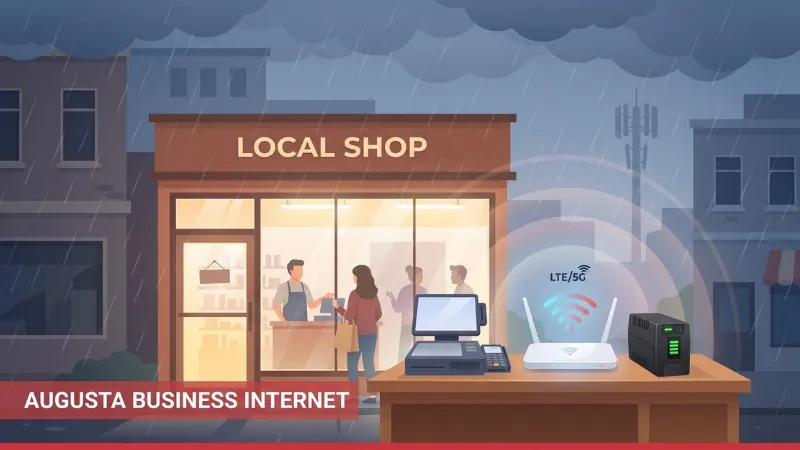
Cash registers, cloud apps, and VoIP all freeze the moment your connection drops. In storm-prone Augusta, the best business internet providers in Augusta, Georgia are the ones that bake LTE or 5G backup into every plan. We combed through contract fine print and ZIP-code data, prices verified September 3, 2026, to find failover that’s automatic, battery-ready, and hands-off. Up next is our continuity-first ranking of WOW!, AT&T, Comcast, T-Mobile, and Verizon so you can stay open when the lights go out.
Which Augusta providers actually include LTE or 5G backup?
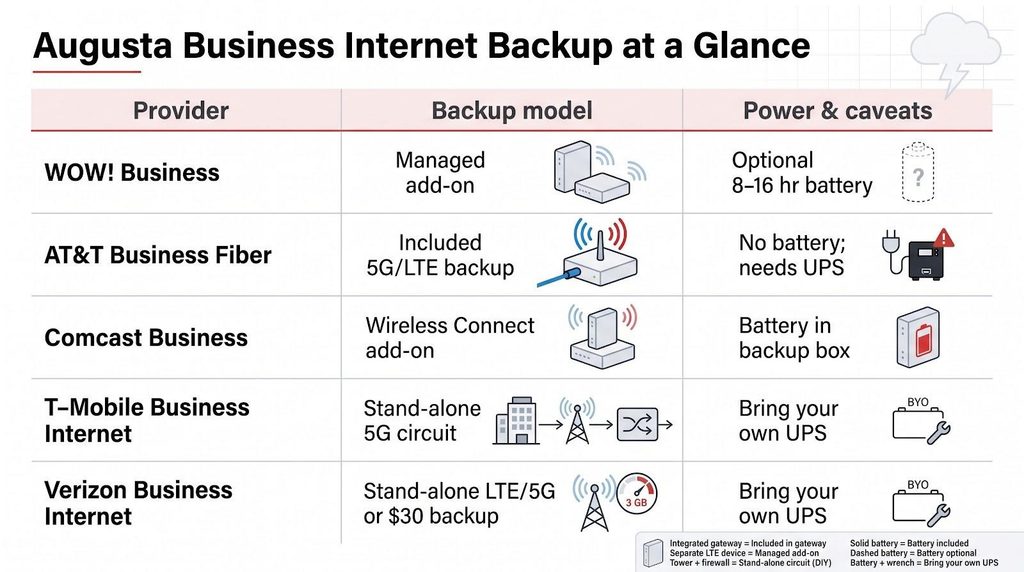
Before we compare speeds or contracts, here’s a quick look at how each carrier handles failover and power.
| Provider | Backup status | How it works | Power notes |
| WOW! Business | Managed add-on | Dual-SIM Cradlepoint router picks the strongest LTE network automatically | Optional 8-16-hour battery |
| AT&T Business Fiber | Included on 1 Gbps and up | Integrated gateway flips to 5G (or LTE) the instant fiber drops | No battery; external UPS required |
| Comcast Business | Wireless Connect add-on | Dual-carrier LTE plus nearby Comcast Wi-Fi hotspots for triple redundancy | Battery included |
| T-Mobile Business Internet | Stand-alone 5G circuit | Connects to a dual-WAN firewall for automatic failover | Bring your own UPS |
| Verizon Business Internet | Stand-alone LTE/5G or $30 backup plan | Router pass-through; 3 GB cap before a one-time unlock fee | Bring your own UPS |
Remember: “included” covers only the cellular path. Static IP blocks, SIP trunks, and some VoIP lines may not survive the switch to wireless; check each provider’s deep-dive section for details.
How we ranked Augusta business internet providers
Our guiding question: Which service keeps an Augusta storefront online when the primary line fails? Everything else (gigabit bragging rights, teaser discounts, glossy ads) came second.
- Continuity and failover (30 percent): integrated LTE or 5G, dual-carrier diversity, automatic switchover, and battery support
- Reliability and service assurance (25 percent): published network uptime plus any contractual SLA or credit schedule
- Speed and technology (15 percent): maximum symmetrical bandwidth a typical SMB can actually order
- Price transparency (15 percent): clear regular rates, backup add-on cost, and predictable post-promo math
- Support and local presence (10 percent): 24/7 help, regional technicians, and proactive monitoring options
- Likely Augusta availability (5 percent): odds your address qualifies without special construction
Scores come from public product pages and FCC Broadband Facts labels, with prices captured September 3, 2026. Because the model weights uptime and backup so heavily, a company with reliable cellular failover can outrank a faster, less-resilient competitor. If your main priority is raw upload speed, feel free to reshuffle the table.
1. WOW! Business: best overall for continuity-first Augusta SMBs
With advertised 99 percent network reliability and promotional 600 Mbps service starting at $65.99 per month, WOW! pitches itself as an affordable yet dependable choice for local storefronts. WOW!’s official coverage map at Augusta, Georgia high-speed business internet shows its coax footprint across ZIPs 30901, 30904, 30905, 30906, 30907, 30909 and 30912 in Augusta, 30813 Grovetown and 30815 Hephzibah, plus Aiken, South Carolina ZIPs 29801, 29803 and 29805.
Where WOW! is available in Augusta
Most storefronts qualify for 300 Mbps, 600 Mbps, or 1.2 Gbps cable. WOW! advertises 99 percent network reliability and free professional installation on promotional terms. You have two pricing paths: FCC-label standing rates (for example, 600 Mbps for $89.99) are month-to-month with unlimited data, while promotional rates (600 Mbps for $65.99) require a one-year term agreement and early termination fees apply (third-party listings put the fee at 75 percent of the remaining contract; get the formula in writing).
Why its wireless backup wins
For $44.99 a month, WOW!’s managed Wireless Internet Backup kit is the differentiator. A Cradlepoint E100 router holds two SIMs, monitors signal quality continuously, and shifts traffic to the stronger carrier the instant coax drops, no log-ins, no manual toggle. Add the optional battery (rated for eight to 16 hours by WOW!) and card readers keep humming even during an outage.
Because the Cradlepoint is installed by WOW! as the failover device ahead of your own network gear, your internal devices do not have to be reconfigured when the line switches; what happens to public IPs and VPN tunnels is a question for the rep.
Gotchas to watch
- The LTE path runs far below your cable speed, so plan for a slower day during failover; ask whether the router’s wired pass-through affects the 1.2 Gbps tier when the line is healthy.
- WOW!’s 99 percent figure is a network statistic, not a cash-back SLA. Request a written credit schedule if “five nines” is mission-critical.
- Promotional term plans in Augusta remain cap-market contract-dependent, so never assume unlimited data on a term plan unless the contract explicitly states it.
Best fit
Choose WOW! when automatic, battery-backed failover matters more than symmetrical uploads. Retailers, medical offices, and any shop that cannot rely on a cell-phone hotspot will sleep easier with that dual-SIM Cradlepoint guarding the line.
2. AT&T Business Fiber: best for symmetrical speed with built-in 5G backup
Where AT&T lights up fiber in Augusta
AT&T’s fiber runs through downtown, West Augusta, and pockets of Martinez before thinning toward rural Richmond County. A Broad Street address check typically returns five symmetrical tiers: 300 × 300 Mbps, 500 × 500 Mbps, 1 Gbps, 2 Gbps, and 5 Gbps. Entry plans sit below $150 per month, include free online installation, and carry no annual contract.
Why the integrated backup stands out
On the 1 Gbps tier and above, AT&T’s gateway automatically flips to the company’s 5G (or LTE) network the moment fiber drops, no extra fee, no second router. The trade-offs matter:
- Data ceiling: AT&T does not publish a backup data allowance or a post-allowance speed for the built-in 5G path; ask for both in writing before you plan a multi-day failover.
- Static-IP and VoIP limits: Public static-IP blocks and AT&T VoIP lines stay on fiber and do not cross to cellular.
- Power protection: The gateway ships without a battery, so a UPS must cover the gateway, firewall, switch, and Wi-Fi during outages.
Bottom line
For offices that need multi-gig symmetrical throughput, AT&T offers a tidy one-box solution. Budget a UPS, confirm how much data the 5G path allows, and check that any static-IP or VoIP requirements are compatible before you sign.
3. Comcast Business: best for broad wired availability
Augusta footprint and core plans
If your address can take a coax cable, Comcast almost certainly serves it. Shared-broadband tiers run 300 Mbps, 500 Mbps, about 1.25 Gbps, and 2 Gbps downstream, while upload speed varies by block. A typical 12-month intro price starts around $70 for 300 Mbps, then rises after month 12. Check the Broadband Facts label before you commit.
The big news is Wireless Connect. For $35 a month Comcast installs a battery-powered modem that juggles three paths: two LTE networks plus nearby Comcast public Wi-Fi hotspots. Because the unit carries its own 8-16-hour battery, failover works even when the breaker trips, giving small businesses rare carrier diversity and power protection.
What Wireless Connect adds, and where it falls short
- Asymmetric uploads. Comcast’s standard cable service is still heavily downstream-weighted unless your address qualifies for a fiber-fed symmetric product. Real-time off-site backups may choke.
- Promo cliff. Comcast lists 300 Mbps at $70 a month on a one-year contract and $110 on its five-year price-lock option; ask what the bill becomes after the first term and plug that into any three-year TCO model before signing.
Best fit
Choose Comcast when you need the widest wired reach, want a fully managed backup with its own battery, and can budget for price escalations. Multi-location retailers and clinics already using Comcast voice or security bundles will appreciate keeping everything on one bill.
4. T-Mobile Business Internet: best low-cost secondary connection
What Augusta buyers actually get for $50
T-Mobile keeps things simple. For $50 a month with an eligible T-Mobile voice line (Small Business Grow plans for firms under ten employees start at $35), you receive an unlimited 5G fixed-wireless circuit, a T-Mobile gateway, and a five-year price guarantee on the data rate. No contract, no installation crew, and no early-termination fee. Place the gateway near a window, run the app’s speed test, and you are online in about 15 minutes.
Speeds vary by tower load, distance, and building materials, and uploads can drop into the double digits during the evening streaming rush. That variability makes T-Mobile ideal as backup or rapid-deploy primary service, not a one-for-one fiber replacement.
Automatic failover requires your own dual-WAN firewall. The gateway supports bridge mode, yet it will not shift traffic off a Comcast or WOW! modem by itself. You also need a UPS; T-Mobile ships only the power adapter. The upside is pure path diversity, the signal arrives through the air rather than the same pole as your wired ISP.
T-Mobile’s SuperBroadband bundle pairs 5G with Starlink and advertises a 99.99 percent uptime SLA, but plan on roughly doubling the budget. Most Augusta shops simply feed the $50 circuit into an existing firewall. For pop-up stores, construction trailers, or any business that values predictable pricing over symmetrical uploads, it’s an attractive safety net.
5. Verizon Business Internet: best for low-data, device-level backup
When 3 GB is enough
Verizon sells two flavors of fixed wireless: primary 5G Business Internet at 100, 200, or 400 Mbps, and a Backup & Flexible Use LTE plan built for emergencies. The backup line costs $30 a month and includes 3 GB of data; exceed that cap and the router unlocks unlimited use for a one-time $70 charge, good for the rest of the billing cycle, according to Verizon.
How the backup works
Installation is true plug-and-play. Place the gateway behind your primary router, enable IP passthrough, and set failover rules in the firewall. Because the radios live in a separate box, you keep existing static-IP blocks, though they disappear once traffic swings to Verizon’s dynamic pool.
Power and pricing cautions
Verizon ships no battery, so a UPS must cover the gateway and core network gear. Each line also carries taxes, fees and Verizon’s Economic Adjustment Charge, and bundle discounts on higher-speed 5G tiers do not apply to the $30 backup plan.
Best fit
Choose Verizon when you need just enough bandwidth to keep card readers, ticket kiosks, or a few laptops online and when your environment already trusts Verizon LTE addresses. It is cheaper than paying $50 every month for an unlimited secondary circuit, provided 3 GB normally covers your failover window.
Included vs. optional vs. DIY backup: what you’re really buying
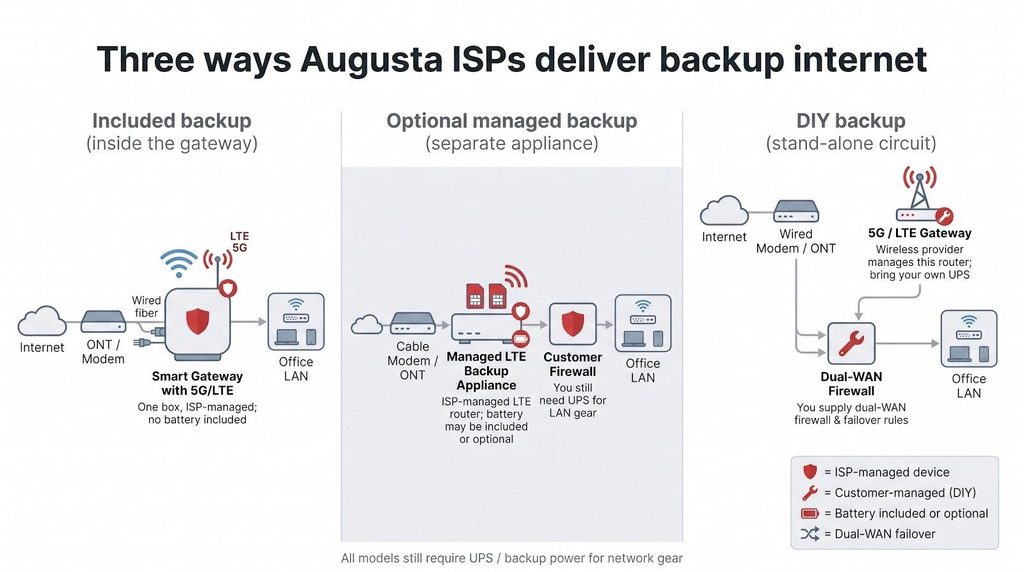
“Stay online when the internet goes down” looks identical in a brochure, yet providers deliver that promise in three very different ways:
RECOMMENDED FOR YOU


Can RiseAngle Help Businesses Win the TikTok and YouTube Shorts Era?
Startuprise
May 15, 2026

1. Included backup (inside the gateway)
AT&T owns this lane. When fiber fails, the same box flips to 5G at no extra charge. Power, static-IP continuity, and VoIP crossover are still on you.
2. Optional managed backup (separate ISP appliance)
WOW! and Comcast install a carrier-agnostic LTE device in front of your router. You lease the hardware, they monitor it, and Comcast ships a battery for the backup device. You still need a UPS for the rest of your network.
3. DIY backup (stand-alone wireless circuit)
T-Mobile and Verizon provide a 5G/LTE gateway. You supply the dual-WAN firewall, write the failover rules, and add a UPS. This path has the lowest monthly cost but the heaviest IT lift.
Know which model you are choosing, then list the battery, static-IP workarounds, and any service-credit language before approving the quote.
Backup internet is not backup power
An LTE router cannot power itself, and neither can your fiber ONT, firewall, PoS tablet, or ceiling-mounted Wi-Fi. When the breaker trips, every device in that chain goes dark unless a battery or generator steps in.
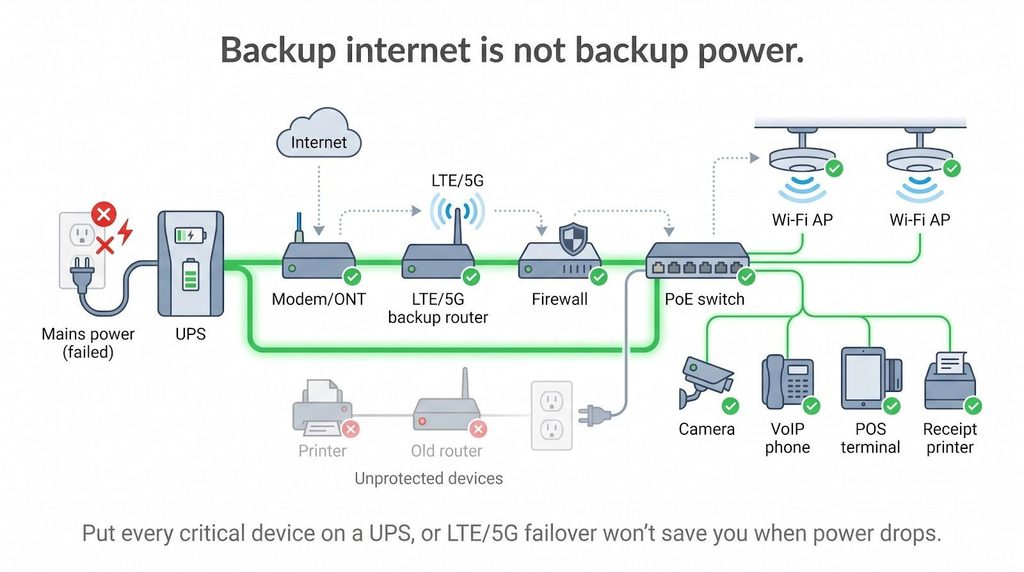
Start at the wall. Cable and fiber modems rely on low-voltage power bricks; pull the plug and even the smartest failover script dies instantly. The rule also applies to AT&T’s integrated 5G gateway and Comcast’s Wireless Connect box. Comcast ships a battery for the backup device, but the rest of your stack still needs protection.
Work downstream. Dual-WAN firewalls and Power-over-Ethernet switches can draw 60 W or more, especially when they feed cameras or access points. Size your UPS for at least 45 minutes of runtime; during Hurricane Helene in September 2024, outages across Richmond County ran far longer than any UPS could cover.
Do not forget the hidden loads: receipt printers, credit-card PIN pads, and VoIP handsets all sip from the same UPS. Miss one device and your “always-on” claim crumbles within minutes.
Bottom line: price your batteries first, then celebrate cellular backup.
What may stop working during LTE or 5G failover
Cellular backup keeps packets moving, but not every service survives the jump from wired to wireless. Watch these choke points:
Static public IPs. AT&T’s product brief says its static blocks stay on fiber and never traverse the 5G path, so inbound VPN tunnels and IP-whitelisted SaaS connections drop until fiber returns. Neither WOW! nor Comcast publishes how a static IP block behaves once traffic moves to the LTE path; ask each rep for a written yes or no before you rely on inbound VPN or IP whitelisting during an outage.
Hosted VoIP. SIP trunks often bind to a single IP. AT&T’s own VoIP stays on fiber, Comcast does not publish whether its voice service follows the Wireless Connect path, and third-party trunks depend on how tolerant your PBX is of mid-call IP changes.
Payment terminals. Many processors approve traffic only from fixed IP ranges. When the address pivots to a Verizon or T-Mobile pool, legacy countertop units can fail handshake. Square and Stripe usually ride out the change.
High-bandwidth uploads. Cloud backup agents and security cameras can blow through Verizon’s 3 GB backup cap or run into whatever allowance AT&T applies to its 5G backup path. Pause nonessential tasks the moment you hear the UPS beep.
Test these edge cases at least quarterly so failover feels like a planned landing zone, not a gamble.
How to compare prices without falling for the teaser rate
Provider websites splash intro rates in bold type, but those numbers often disappear long before your contract ends. Do the math up front.
1. Check the term length and step-ups.
Comcast publishes low first-year rates, then shows a higher rate once the first-year term ends. WOW! offers standing no-contract rates alongside its promotional term rates, so any three-year cost calculation must name which rate it uses. AT&T shows flat pricing for online orders only, and bundle discounts vanish if you drop wireless service mid-term. Verizon adds an Economic Adjustment Charge on top of the plan price, while T-Mobile locks the base rate for five years, but taxes and fees still apply.
2. Add equipment and backup fees.
Static-IP blocks run $10-$25 a month from most wired carriers. Comcast’s Wireless Connect is $35 and WOW!’s Wireless Internet Backup is $44.99. AT&T includes 5G backup only on 1 Gig and above; on the 300 and 500 tiers you buy your own wireless backup. None of the carriers include a UPS for the rest of your network.
3. Chart total cost of ownership.
List monthly service, equipment leases, backup charges, and every scheduled price step-up across 36 months. You will usually find the “cheaper” plan overtakes its rival by month 18.
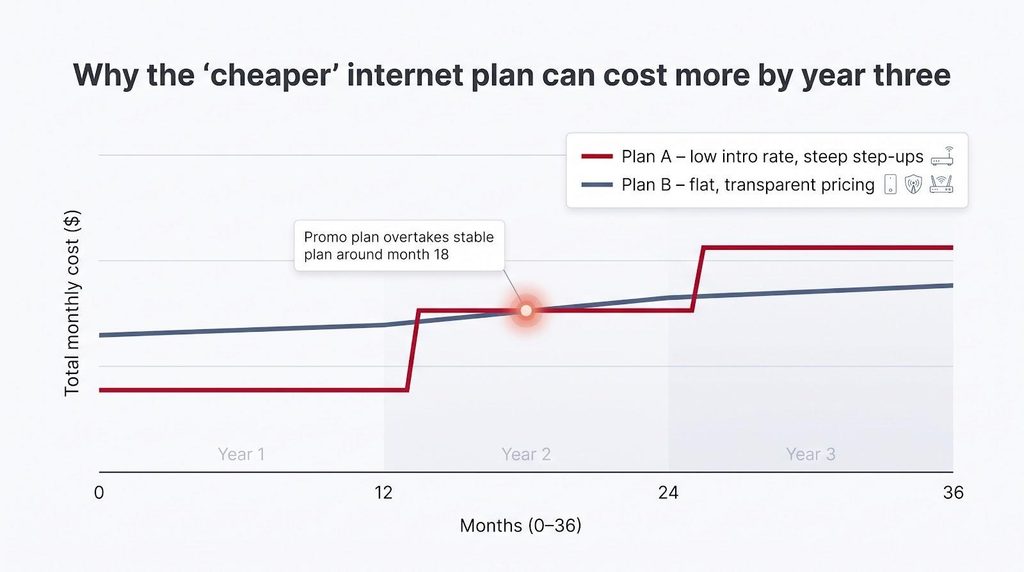
Do that calculation before you sign, rather than after the first bigger invoice lands.
Which Augusta provider fits your type of business?
Match the service to the failure scenario and you avoid overspending on speed or under-budgeting for uptime.
Retail boutique on Broad Street
WOW!’s dual-SIM Cradlepoint plus optional battery keeps card swipes and guest Wi-Fi alive even when a storm drops poles. A 300 Mbps or 600 Mbps tier frees cash for inventory instead of bandwidth you will never saturate.
Creative agency in the Medical District
AT&T’s 2 Gbps or 5 Gbps symmetrical fiber with built-in 5G backup handles multi-gig uploads and protects live design reviews without a second box.
Multi-location dental group (North Augusta to Grovetown)
Comcast’s city-wide coax footprint and $35 Wireless Connect add-on let every office share the same static-IP security stack while a battery-backed modem guards against drill-time disconnects.
Masters Week pop-up merch stand
T-Mobile’s 15-minute, no-contract $50 kit plugs into a portable router. Speeds swing, but customers will not notice at checkout.
Farm-supply kiosk in Blythe
Verizon’s $30 Backup & Flexible Use plan delivers 3 GB of standby data, plenty for PoS traffic. If flood repairs drag on, a one-time $70 unlock buys unlimited use for the rest of the month.
The right match solves your outage risk, not the one on the billboard.
Questions to ask before you sign
Slow the sales pitch and pin down these essentials in writing before you commit.
Access and build
- Is this cable, shared fiber, or dedicated fiber, and how symmetrical is the upload?
- If construction is required, what is the firm completion date?
Pricing timeline
- What will the bill be in month 13 and month 25?
- What early-termination fee applies if you need to exit early?
Backup specifics
- Is cellular failover included? If not, what are the monthly, install, and hardware-lease fees?
- Which carrier SIMs are provisioned, and can I verify live signal strength at my address?
- How much data can the backup path use before throttling or overage charges apply?
Static IP and application continuity
- Will my static-IP block, VPN tunnels, and VoIP lines stay online during failover? Ask for a clear yes/no.
Power protection
- Is battery power included for every device in the chain? If not, who supplies and supports the UPS, and how long will it run the stack?
Review the answers side by side. The provider that clears this checklist is the one most likely to stay up when the primary line goes down.
Conclusion
For a storefront that cannot afford a dead register, WOW!’s dual-SIM Cradlepoint with the optional battery is the most complete off-the-shelf failover in Augusta, with AT&T the pick when symmetrical fiber matters more than battery runtime. Whichever you choose, price the UPS first, get the static-IP answer in writing, and test the switchover before the next storm season.
Recommended Stories for You

Startuprise Nov 18, 2025
Startuprise Aug 18, 2026

Startuprise Jun 12, 2026

Startuprise Aug 21, 2025

Startuprise Apr 3, 2026

Startuprise Nov 28, 2025
Trending Stories

The Best Website Audit Tools to Find and Fix SEO Issues in 2026

Prometheum Raises Additional $23M in Funding

10 Best State 529 Plans in Order for Tax-Advantaged College Investment Plans
Top Tools to Create Professional Lip Sync Videos Without a Studio

Bootstrapping 2.0: Selling Your House to Fund Your Startup

10 Best State 529 Plans in Order for Tax-Advantaged College Investment Plans
Benefits of Checking Accounts Many People Don’t Know
How to Turn Blog Posts into Engaging Short Videos for Your Social Media

